This patch adds an alternative storage engine that uses Redis as backend, instead of a big file or a spool directory.
This makes the application a lot more cloud-friendly, as it doesn’t rely on a local filesystem to operate and an instance can be quickly replaced without losing the pending messages.
To use it, you need to configure the store-type as “redis” in Kannel’s config file:
store-type = redis
Then, set a DB Pool connection to Redis:
group = redis-connection
id = redispool
host = localhost
port = 6379
database = 1
max-connections = 10
Last, configure a store-db group with the same id as the pool (in this case, “redispool”) and a table name.
group = store-db
id = redispool
table = store1
NOTE: If you’re sharing the Redis instance across 2 or more Kannel servers, make sure to use different databases and/or table names. Similarly to file-based storage engines, Kannel cannot share the same store across different instances.
Here’s the patch against latest SVN:
kannel-redis-storage-engine
DISCLAIMER: This is by no means considered stable code and needs further testing and benchmarking to be considered safe for production use.
/*
This is a Mini HOW-TO in order to send sms messages via Kannel and sqlbox and keep track of status information.
Author: Rene Kluwen <rene.kluwen@chimit.nl>.
Many thanks to Alejandro to host this how-to on his Kannel blog. The text of this blog is completely enclosed in comment blocks, so you can just copy and paste the whole post in your favorite mysql editor and it will run the code (e.g. create the necessary tables, triggers and stored procedures).
We only need sqlbox and bearerbox. In this example, smsbox is not used. Also we do not use an http server for delivery reports.
Everything is done in Mysql.
To start, we assume that you have a working Kannel and Sqlbox installation. See the Kannel users manual on how to set this up.
Next, we need to collect the following information:
– <sender_id>: The number (or text) that the messages appear to be sent from.
– <smsc>: The smsc that the messages will be submitted to.
– <sqlbox_id>: The ‘smsbox-id’ of your sqlbox instance.
We use these values as defaults in our trigger. Substitute them with your own values, below.
*/
/* first, we drop the table if it exists already, in case we are updating */
DROP TABLE IF EXISTS snd;
/* The following table holds our messages. The messages that are inserted in this table will automatically be sent by Kannel (see trigger below) and the status fields of the message are automatically updated once DLR reports of the message come in (see second trigger). */
CREATE TABLE `snd` (
  `snd_id` bigint(20) NOT NULL auto_increment COMMENT 'Every message has a unique id',
  `snd_to` varchar(255) default NULL COMMENT 'The number that the message is sent to',
  `snd_txt` longtext COMMENT 'The body text of the message',
  `snd_sentat` timestamp NOT NULL default CURRENT_TIMESTAMP COMMENT 'The time that the message is inserted',
  `snd_success` datetime default NULL COMMENT 'The time that the message was delivered to the hand set',
  `snd_failure` datetime default NULL COMMENT 'The time that the message failed',
  `snd_submitted` datetime default NULL COMMENT 'The time that the message is submitted to the smsc',
  `snd_buffered` datetime default NULL COMMENT 'The time that the message is buffered at the smsc',
  `snd_rejected` datetime default NULL COMMENT 'The time that the message was rejected',
  `snd_intermediate` datetime default NULL COMMENT 'Time of intermediate status',
  `snd_last` int(11) NOT NULL default '0',
  PRIMARY KEY  (`snd_id`)
) DEFAULT CHARSET=latin1 COMMENT='This table holds the messages that are sent, including DLR values.';
/* first, we drop the trigger if it exists already, in case we are updating */
DROP TRIGGER IF EXISTS after_snd_insert;
/* The following trigger inserts appropriate values into the send_sms table. Kannel scans this table and sends out any message that is entered, subsequently deleting it. Our message keeps being held in the ‘snd’ table. We keep a reference to our record in `snd` by inserting `snd_id` in the dlr_url place holder. */
CREATE TRIGGER after_snd_insert
    AFTER INSERT ON snd
    FOR EACH ROW BEGIN
    /* Below we use some default values. Replace them with your own. Also replace send_sms in case you configured a different
       name for sql-insert-table in your sqlbox.conf */
    INSERT INTO send_sms (momt, sender, receiver, msgdata, smsc_id, sms_type, dlr_mask, dlr_url, boxc_id)
    VALUES ('MT', '<sender_id>', NEW.snd_to, urlencode(NEW.snd_txt), '', 2, 31, NEW.snd_id, '<sqlbox_id>');
END;
/* first, we drop the trigger if it exists already, in case we are updating */
DROP TRIGGER IF EXISTS after_sent_sms_insert;
/* The second and final trigger updates the status fields of our ‘snd’ table.
Kannel inserts all dlr reports in the sent_sms table. We pick up the information from there and use it to update our original record in the snd table. Remember, we have the `snd_id` in the dlr_url field. */
CREATE TRIGGER after_sent_sms_insert
    /* again, replace sent_sms if you configured a different name for your sql-log-table. */
    AFTER INSERT ON sent_sms
    FOR EACH ROW BEGIN
        IF NEW.momt = 'DLR' THEN
            CASE NEW.dlr_mask
            WHEN  1 THEN UPDATE snd SET snd_success = FROM_UNIXTIME(NEW.time) WHERE snd_id = NEW.dlr_url;
            WHEN  2 THEN UPDATE snd SET snd_failure = FROM_UNIXTIME(NEW.time) WHERE snd_id = NEW.dlr_url;
            WHEN  4 THEN UPDATE snd SET snd_buffered = FROM_UNIXTIME(NEW.time) WHERE snd_id = NEW.dlr_url;
            WHEN  8 THEN UPDATE snd SET snd_submitted = FROM_UNIXTIME(NEW.time) WHERE snd_id = NEW.dlr_url;
            WHEN 16 THEN UPDATE snd SET snd_rejected = FROM_UNIXTIME(NEW.time) WHERE snd_id = NEW.dlr_url;
            WHEN 32 THEN UPDATE snd SET snd_intermediate = FROM_UNIXTIME(NEW.time) WHERE snd_id = NEW.dlr_url;
            ELSE UPDATE snd SET snd_last = NEW.dlr_mask WHERE snd_id = NEW.dlr_url;
            END CASE;
        END IF;
END
/* In the end, a listing of this helper function we need because sqlbox expects the msgdata field urlencoded. */
DROP FUNCTION IF EXISTS urlencode;
CREATE FUNCTION urlencode (s VARCHAR(4096)) RETURNS VARCHAR(4096)
    DETERMINISTIC
    CONTAINS SQL
    BEGIN
        DECLARE c VARCHAR(4096) DEFAULT '';
        DECLARE pointer INT DEFAULT 1;
        DECLARE s2 VARCHAR(4096) DEFAULT '';

        IF ISNULL(s) THEN
            RETURN NULL;
        ELSE
            SET s2 = '';
            WHILE pointer <= length(s) DO
                SET c = MID(s,pointer,1);
                IF c = ' ' THEN
                    SET c = '+';
                ELSEIF NOT (ASCII(c) BETWEEN 48 AND 57 OR
                    ASCII(c) BETWEEN 65 AND 90 OR
                    ASCII(c) BETWEEN 97 AND 122) THEN
                    SET c = concat("%",LPAD(CONV(ASCII(c),10,16),2,0));
                END IF;
                SET s2 = CONCAT(s2,c);
                SET pointer = pointer + 1;
            END while;
        END IF;
    RETURN s2;
END;
/* end of helper function urlencode */
/* Usage example; substitute the given number (and text) with your own: */
INSERT INTO snd (snd_to, snd_txt) VALUES ('1234567890', 'My first example text to send...');
/* After inserting this message, Kannel will send it and update it’s status fields automatically. */
A work colleague tweeted about this article written by Bill Taylor, and he (my colleague) asked me what I thought about it.
While the article is very well written and the author raises a few very good points, I disagree with part of it. Perhaps, I have a slightly different point of view about the subject.
Let me quote a couple sentences from it to analyze them in context:
“Five great programmers can completely outperform 1,000 mediocre programmers”
I completely agree with that sentence (told by Marc Andreessen to the article’s author for his book).
Mediocre programmers don’t add value, they usually subtract from it. They’re usually also mediocre Team players, making things worse.
Later, he contrasts that sentence with this one:
“If you were launching a technology or developing a product, would you rather have five great engineers rather than 1,000 average engineers”
While contextually they seem to be mutually exclusive, I happen to agree with that sentence as well, because I think there’s a not-so-subtle difference between “average” and “mediocre” that the author is simplifying. In my opinion average and mediocre are not the same.
Average engineers add value. If they’re also good team players, they can add a lot of value and they can surely outperform a smaller group of “Rock Stars”.
There’s an important concept that the article also doesn’t quite grasp or at least it’s not presented with the relevance it deserves: Teamwork.
Non-team-players are a bad idea, no matter how great as coders they are. The only way to overcome it would be to get them doing one-man projects, and those are an even bigger very bad idea company-wise.
However, the article links to another article that analyzes Barça’s (the Spanish soccer team) case. As a Barça fan and Barcelona resident I fell particularly identified with the example. Let me add a little bit of my view to the article:
Barça has the best soccer player in the world (Lionel Messi, I’d call him a “Rock Star”) and a lot other players that are way above great (Xavi, Iniesta, Pedro, Villa, to name a few). Most of them were raised on the Club, not bought from other Clubs. Barça also have a few more “average” players in comparison, but most of them are really, really good ones. I wouldn’t say that there’s any mediocre players on the Team.
Curiously enough, Messi played his share of matches with the Argentinian selection (also with a good deal of the best soccer players around, most of them currently playing on the best European Clubs and being extremely successful at it).
The outcome? Completely unremarkable. Messi didn’t score a single goal on the world cup and the team didn’t make it past quarter finals. Why? Because they weren’t a Team, just a bunch of -extremely- talented players doing a mediocre job as a Team.
You can assemble a team of great people if they’re good team players, there’s nothing wrong with it and it will outperform much bigger teams. Barça is a proof of it, but I’m sure there’s a good deal of other examples around.
I consider myself extremely lucky of working head-to-head with a lot of great people (both as Engineers and Team players) at 3Cinteractive and I can’t imagine a better working environment (BTW, we’re hiring). It proves to me that you can assemble a team of great people and accomplish a lot, as long as they’ve got what it takes to work together as a team.
In contrast, mediocre Team players will ruin any team as much as mediocre coders would slow it down.
I think one should aim for hiring at least average programmers that are above average (no concessions there) team members, or average team members that are above average programmers, but I’d ban mediocracy from one’s working environment completely. Oh, and average as in decent, not less 🙂
Note: the later article got it all wrong about the “Catalonia is not Spain” part. Those banners are a display of extreme nationalism/separatism with which I’m completely in disagreement.
This is what I’d call my “Programmer’s Grid”, depicting in an image what I’d tried to describe with words above.
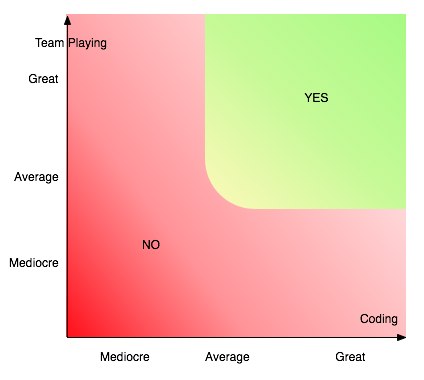
And this is my perhaps biased opinion, based on my own experience. What do you think?
Alex
June 22nd, 2011 in
Misc |
1 Comment
During the last few days I’ve been posting a good deal of patches I’ve been working on. I hope you like them.
Also, I’ve added a multi-lingual plugin and started translating my latest post to Spanish. It will take some time to get all the older posts translated, but I’ll eventually get that done.
I hope this will help the Kannel spanish-speaking community of users. I know a few of them 🙂
It was about time to get my blog up to speed again.
Regards,
Alex
November 17th, 2010 in
Misc |
Comments Off on Up-to-date… and bilingual!
When you start Kannel, it attempts to start all the configured SMSC binds. While this is usually what most people needs, there might be some cases when you don’t want all your binds to come up at once:
- Failover routes that you manually enable when needed.
- New binds being worked out, not ready for production.
- Test binds you use only from time to time.
- Etc.
This patch allows you to configure in which state a bind will start when booting (or when adding it with the add-smsc command). This is done by a new parameter on the smsc group called start-at-boot, which defaults to true if not present.
In short: just add the following line to an smsc group:
start-at-boot = false
and that smsc will start as “dead” and will require a start-smsc command to activate it.
Download the patch from here.
As usual, this is fairly untested code and should be used with caution.
Please try it and let me know if you encounter any issues.
Alex
November 17th, 2010 in
Kannel | tags:
Kannel,
patches,
smsc |
1 Comment
This is a nice-to-have feature IMHO, since right now you can only tell how many messages per second Kannel is sending globally, but not on a per-smsc basis.
This patch addresses that, adding to each smsc the same three counters Kannel uses for global traffic.
NOTE: The text and XML schema on the status page changed to accommodate the new counters, so if you’re parsing it from your code you’ll probably need to make a few changes to be able to parse it correctly.
Please download the patch from here.
As with most new patches, proceed with caution and test it thoroughly before using it on live systems.
Regards,
Alex
November 17th, 2010 in
Kannel | tags:
Kannel,
meter,
patches,
speed,
tps |
2 Comments
This patch implements syslog logging on bearerbox, smsbox and wapbox.
It uses two configurable parameters:
- syslog-level (0-7) defines the desired logging level.
- syslog-facility (string) defines the syslog facility to use. Default is “daemon”, but you can set any of the valid ones (kern, auth, local0..7, etc.).
To use it, you need to add syslog-level and syslog-facility to the core, smsbox and/or wapbox group. You might also need to tweak your /etc/syslog.conf to suit your needs (I won’t teach you how to configure syslog here, you can Google it yourself isn’t it? ;)).
The patch in its current state it will only work for bearerbox, smsbox and wapbox logs. It won’t log anything from SMSC connections nor the access log.
Please download the patch from here.
NOTE: This is fairly untested and it’s not part of Kannel’s main tree, so use it with caution.
Give it a spin and let me know if it works for you.
Alex
November 16th, 2010 in
Kannel | tags:
Kannel,
patches,
syslog |
1 Comment
A problem that many people encountered while using SqlBox was that it was tricky to cope with charsets and binary messages when a DB was involved.
There were many things that can go wrong when storing data as text on a DB, specially if it involves non-ascii characters.
To fix that, Stipe Tolj recently submitted a patch that modified SqlBox to url-encode the message before writing it to the DB, and url-decodes it when reading from it.
That fixed the issue with special characters, but when you need to send binary messages you also need to deal with the udh field, which can be even more problematic (try writing a binary zero and you’ll know what I mean 😉 ).
To fix that, I’ve extended his patch to url-encode/decode the udhdata column as well. With this two fixes you shouldn’t have any issues sending special characters, wap-push and other binary messages either.
Both patches are now part of SqlBox and you’ll get them if you download the latest snapshot, or the SVN head.
IMPORTANT NOTE: If you’re relying on inserting messages on the “send_sms” table, you might need to change your code to url-encode the messages first.
Regards,
Alex
November 16th, 2010 in
Kannel |
Comments Off on New storage format for SqlBox
A lot of stuff has been happening lately on the Kannel project: lots of new patches, bug fixes and even a brand new development release.
With the release of Kannel 1.5.0 Development Version on Oct. 20th., Sqlbox is now part of Kannel’s distribution.
This is really great news, because you’ll get SqlBox along with Kannel.
You’ll also get OpenSmppBox as well (an Open Source SMPP server implementation for Kannel).
You can get the new release on the Downloads Page as usual. Browse down to the Development Release section.
Hope you enjoy it!
Alex
Is that time of the year again, and MWC is just a few days away. I’m sure a lot of new stuff will be showcased this year as usual (I’m particularly curious about augmented reality since it gained a lot of momentum lately, but I’m sure we’ll se a full lot of social apps, mobile web portals, LTE ,WiMax, etc, etc.).
I hope is a good time for Kannel developers and users to assemble and meet having a good time together as well.
If you happen to be at the Fira this year and want to meet with me just drop me a note in private.